Showing posts with label Game Design. Show all posts

Thursday, September 26, 2024

Missouri - New Assets to Build the World With

We have another preview of the Missouri map expansion for our #BestCommunityEver! This time, we would like to show you some of the new models our asset makers are working on which you will find scattered across the map in this upcoming DLC. You will also read about how they prepare the models from scratch for their final design.

Keep in mind that these models showcased here are not the only new assets we have been working on, and that this DLC is still a work in progress. Among many other models, we are proud to show you these beauties inspired by the real-world locations in various parts of Missouri such as the Jefferson Performing Arts Center, the Joplin church, the statue in Kirksville, St. Joseph's water building or the pedestrian bridge in Rolla. But that's not all, in total, we have put together over 350 new models just for this map expansion!

Are you interested to know how these models are put together? Our talented asset makers work on them in Autodesk Maya from the first draft to the final design. As you can see in the first image below, first they put together a basic model with no details and textures, serving as a placeholder for more adjustments.

Once they have that done, they proceed to modify the geometry and add details. In this step, it is important to have an overview of the model structure, which allows them to modify the shape and detailed elements. In the image below, you can see the model in Shade mode without textures, with the wireframe view added. This shows how the model is structured and how the different parts of the model relate to each other.

The last step is to apply the textures and make final adjustments. Now, you can see the final look of the model, ready to be used in a variety of applications. On the very first picture of this blog, you can also see this model's final look in the game.

We hope you are looking forward to trucking in the Missouri DLC. If you do, make sure to add it to your Steam Wishlist! And don't forget to follow us on our TwitterFacebookInstagram, and YouTube, so you won't miss out on any American Truck Simulator news. Until next time, happy travels!

Tuesday, December 1, 2020

Iberia & New Light System: Development Teaser

Yesterday, we approached you with news of a very important decision for us. While we are 100% sure we chose the right path, we were quite nervous about how the fan community will accept this mixed news. We went all-in on trust and hope that everyone will understand and follow our hard decision. Extending development time on a project is not a cheap adventure, but the Iberia team deserves the chance to fully realize their vision, and synchronizing the release with our new light system will give the map expansion a chance to truly shine. It is also very important that compressing both releases into a single testing cycle, any long-term effects on future releases are minimized.

We are grateful for and humbled by the response coming from our #BestCommunityEver. Thank you for once again reassuring us that we are in this together.

As we hinted yesterday, to make up for the shock of the initial announcement, we felt that we need to show you a bit more. So we rushed to come up with something literally overnight. Today we are happy to share a short development teaser video presenting a bit of the new light setup, coincidentally recorded at locations from an up and coming Euro Truck Simulator 2 map DLC. The team still has a ton of work ahead of them to adjust so many models and textures to the new system. We only have a few locations (and still subject to further tweaks) that are close enough to completion that we can consider them ready to be shown. So the teaser is rather short, but it should give you a very good idea of what kind of improvements the new light system will bring for both ETS2 and ATS with the 1.40 update.

We hope you like what you see there already! Keep an eye on our blog and social media channels because we plan to bring you more updates and hot news on these topics.

Friday, July 24, 2020

Under the Hood: How to Build a "Functional" Area for a Truck Simulator

Michal "Seki" Sekela has been working at SCS Software for a few years in the 3D Graphics Department. Together with our American Truck Simulator art team, he has worked on the Oregon and Washington map expansions and continues to work on upcoming content releasing this year. He shares the following with us.


We have covered the process of map creation in one of our previous blog posts, which is a highly complex task which our map team has been doing a fantastic job with. The job of a 3D graphics designer will probably be easier for you to understand, and we expect that most of you will have some idea about what this job entails. Let us show you a peek under-the-hood of the design and creation process of depots in American Truck Simulator; depots that may become a factory, an industrial area, a production complex, or a storage area.


A depot is also a place where we thoroughly test your driving and maneuvering skills while giving you a glimpse of the various industrial activities that you may typically find happening in such a location. In Seki's opinion, depots are the second most important part of the game, right after trucks. One might imagine that modeling a depot means having a 3D designer locking himself up in a dark room for weeks, while others peer through his/her door eagerly awaiting the final result. While some of this is true when finalizing the models, the process most-certainly involves more collaboration between departments.

The design draft of a selected location and its functionality is a multi-department process. This may involve our game-researchers, map designers, programmers, testers, and graphic artists. A researcher begins the process by scouring for information about the industry in its given location. At the same time, a map designer prepares a prototype of the surrounding road network and terrain; we need to know exactly what fits in the given area because we're limited by the game's 1:20 scale.

The United States is a massive country, so a lack of space is something that most companies need not worry about, which is evident with some factories stretching up to a few kilometers long. A 3D designer, therefore, has to come up with a solution to capture the essence of the location, while fitting within the limits presented by our scale (as we cannot utilise too much space for a single factory). The results must be acceptable when viewed from every angle; when players drive to such places, they should be able to recognize the location (with a little bit of "artistic license").

Some of the depots found in ATS are real-life landmarks. With these, we strive to preserve them in their truest form, given the constraints. We also have a lot of generic depots that are expected to be re-used; with these, we are trying to distill the typical patterns shared across a variety of real-world locations. Unfortunately, the architects of these buildings did not expect to have their designs featured in a video game. Consequently, our team has to come up with a three-pronged approach. Firstly, the depot has to make visual and logical sense, secondly, it has to fit in the map, and lastly, it must be completely functional for the player.

The biggest depot you will find in ATS covers 591,692 square feet. In this case, it's a landmark depot of course (take a guess what this might be). In most cases, we usually have smaller places in order to fit them into cities such as storage areas, supermarkets, and small service depots.

Right now we're trying to create depots that are as unique as possible. Since Oregon, these have consisted of a core area on which the player drives his/her truck, while additional parts are created and placed manually from suitable assets by the Map Designer responsible for this part of the map. Thanks to this we are able to create a more immersive experience for the player and give them a feeling of navigating within a large complex. Dividing the depot into parts also helps us to better customize and optimize it.


When we're certain what depots are coming, our researchers help us with the logic and functionality of said location. For example, a paper mill has a specific building layout, with each building serving a unique function. This research allows us to accurately represent this area in a realistic manner so that it lines-up with our real-life references. Another example is the food industry, where it is industry-standard to have the loading and unloading docks separated. This also means not placing trash cans too close to a place where new goods are accepted.

The 3D designer also has to take into account the length of the truck and trailer combination. At this time, we have trailer combinations up to 118 feet in length, when paired with the longest truck configurations. With the arrival of triple trailer combinations and oversized transports, we've had to adjust all of ATS' depots, so that a player can get in, hook up the trailer, and drive out.


After gathering all the necessary data, the 3D designer will create a placeholder model, where all the different depot parts and various parking locations (for the 3 different difficulty levels) are marked by simple shapes. What follows then is a back-and-forth between the 3D designer and our testers, who will test the depot thoroughly for gameplay and visual issues. Our testers' feedback allows us to adjust the model to fix any identified issues. This is not a quick or easy task, considering all the possible combinations. To hasten the process, the 3D designer is generally familiar with what is expected, and to apply these considerations to the initial prototype in advance. This is to prevent the testing/feedback process from taking too long before the depot is ready for final production. This and a great many other details depend on how experienced a 3D designer is, which is why only senior designers are working on depots here in SCS.


After all this, a Map Designer connects the placeholder model to the road network and the rest of the map. With that, the economy team starts working on the depot, and the Map Designer on the depot's surroundings. This is also the phase when the 3D designer can lock himself up in some dark basement and start modeling. He still needs to communicate with the rest of the team, so at the very least, he's got to have an internet connection there.


The whole process of depot-creation can take weeks or even months in really difficult cases. The depot's presence and quality grow incrementally in the map as the 3D designer updates it, while a map designer checks to make sure that everything is integrating properly. The depot's progress is also often consulted with our Art Lead. Modeling is pretty smooth-sailing when the necessary research and testing of the placeholder's layout is done.

And with this, we conclude this inside look into creating one of the major parts of a Euro/American Truck Simulator project. We hope you appreciate this small insight into the 3D graphics team, which doesn't only create vertices in the shape of a house but also has to devise and execute the entire depot-creation process. In the future, we are planning to build even more complex and impressive depots with the aces up our sleeves. Enjoy!

Tuesday, March 10, 2020

Under The Hood: Characters

Dominik Luska is a 3D graphic artist working at the SCS Software for more than 4 years and has worked on almost all currently released map expansions. His job description consists of recording animations in motion capture, modelling, retopology of a high-resolution model, texturing and importing the model into the game. He works alongside Animator and Map Designers to create pedestrians, workers and other living characters that can be seen in our truck simulator games.


If you are interested in how are we create people and animal animations that can be found within Euro / American Truck Simulator, you've come to the right place. First and foremost, I need to emphasize that pedestrians and other characters don't play an important role as trucks and depots, not even close. However, they still play a role in our games, so we need to make sure they receive the appropriate care. At this moment, we have over 30 character models in our trucking titles. They are all characters you can see around our world. For example, you can see, security workers, police and customs officers, people taking photos of oversized cargo on their phones and more. To create a world full of life, we need to differentiate them from each other by their actions, their animations and by their looks. Some of them are universal, of course, so we use them between projects to save work and time. Besides those universal, we have specific characters for a more specific project, country or city. For each character, there are four textures, two for clothing and two for the body.

There are also additional items (or as we call them "props“) which our characters can hold or use, these items are included in final animation files. The amount of data for these models and animations are not insignificant, and to help us not to become confused between textures and models, we're using an absolute classic - Total Commander. Every file has a naming convention in English language to make it accessible and understandable to everyone.


When we're importing finished data into the game, we need to save exported model or animation and also a source file for these animations of models; just in case we need to make some adjustment or change in the future. We have a whole folder structure specifically for animations, models, textures, and a skeleton. Data organization doesn't end by files, folders and their naming convention though. We can't forget about the flawless management of each model in definition files that is nearly as important as previously mentioned folder structure. To give you some basic introduction to definition files, every single model has to have the correct unique designation number and a brief name for Map Designers.


At the very beginning, we create a model according to a reference file. These references are sourced from our Researchers - a special department in our company who are responsible for searching up data, pictures and information; simply anything the rest of the company needs, saving a lot of time to Modellers, Animators and Map Designers. This first model is called "LOD 0". This abbreviation means „Level of Detail“ and this system serves to toggle between lower and higher resolution models according to the range from the point of view. We have 4 LODs in our game for characters; in which the last of them serves for 100+ meters distances. LOD has to be thoroughly checked too for drastic changes, for example, we don't want to have legs or head disappearing within 10 meters of its viewpoint. Some animated models also have a "collision model", which stops players going through a character. Such a collision model are found on non-animated and static models too. And why don't we allow people to go through buildings and characters? Because our games have received an age rating of 3, which we'd like to keep. Thanks to it, anyone can play our games, even kids.

When we're satisfied with the model and its LODs, we will move to the UV mapping, or rather unwrapping of a 3D model on a 2D plane, so the texture can be created. This process also takes some time mainly because of the more important parts of the model get a bigger space on the texture. That means UV unwrapping must be created as effectively as possible. For example, we mirror small parts of the model like caps, helmets and other props, which spares a precious space on the following texture for this model. After this, we create a texture for this model according to the references we have received. Every character gets a normal map. A normal map is a picture, which simulates a soft geometric structure, which is used to create an illusion of higher detail on a low-resolution model. Normal maps are used for folds, buttons, embroidery, pockets and similar details.

After we're done with the textures and model, a more interesting and yet also a little bit frustrating process begins, recording character animations. To save time and energy on NOT doing it the most time and energy demanding way, we're using an improvised motion capture (MoCap), which we use to record rough animation foundations. I'm saying "rough" because amongst the disadvantages of this type of mocap is its accuracy on important bones, such as collarbones or wrists. We're not using full-fledged mocap, but a cheaper variant built on two Kinect sensors (2nd generation). These sensors use a depth camera, and since they're standing against each other, they "see" how a man or woman moves on the scene with some accuracy. This animation method has one advantage, you don't need any special clothes or markers, so anyone can get on scene and start recording. Thanks to this technology we can take anyone in the company and put him in front of the cameras to bring the character models to life.

Before we start recording an animation, our mocap has to be prepared and calibrated. It is necessary to do a short test & calibration recording. This takes up to two hours because there may be problems on different levels, for example, the stations may encounter problems communicating with each other, operating system might be updating just in the right moment when we would like to use it and many other issues can appear. After successful calibration and recording session, we need to adjust these recorded animations "manually" in different programs. In this case, we commonly adjust noise and tremors, movements of bones in the wrong axes, or movements of the wrists that our mocap did not pick up. To understand the recording process fully in detail, we would need to create a separate article, so let's go to the final stage, importing data into our game.

So our finished model with animation is now ready to be put into the game. To make the editor "see" our model, we need to define it correctly in a text file (definition file). In this file, both animated and unanimated models have a link to the model, to its LODs and potentially animation and collision.

When we successfully define the model, we can finally see it in the editor. The editor is our own tool, in which Map Designers build the whole map and in which our Graphic designers are checking on their own models. If there's something wrong, we'll adjust the model or animation in 3D programs like Maya or Blender and re-export it. Since the definition is already there, we can just refresh the model in Editor to see changes right away. It's similar to refreshing a website on the web browser. Models and animations are created in Autodesk Maya, and textures in Adobe Photoshop. To create a normal map, we have to import the model to Marmoset Toolbag software, which serves for "baking" details from the high-resolution model to the low-resolution model. The whole process is more complicated than what I have written here, but then this blog would be twice as long (and maybe even more).

I do hope that I've explained it well enough for you to have some insight into our work. And if you liked the article and you'd like to want more, let us know in comments - and don't be shy to say what exactly interests you.

Friday, January 31, 2020

Under the Hood: How to build a world for American Truck Simulator

This article was originally created for Vortex, Czech-based media. Due to the growing interest in different positions in SCS, we decided to translate the whole mini-series of these talks to publish here, on our blog. Today, we bring you first episode, featuring Ondřej "Duffator" Dufek - ATS world architect


When I meet someone for the first time, they often ask "So, what do you do exactly?". "I make video games, I'm a game developer" I often say, expecting more questions to follow. "Oh, interesting, sounds cool" they respond, but I can tell that they don't understand what that means and continue to ask more. "So work in programming or graphics?" is a common follow up question. "Neither, I'm a Map Designer" which is usually followed by more confusion. And that's why I'm here - to explain what exactly a Map Designer in SCS Software does for a living.

As the name suggests, the main role of a Map Designer is to create maps. Our job is to create a virtual world and environment in which a player travels and works. In SCS Software as you know, we create truck simulators, so we have to create everything you could possibly see outside of your virtual truck's window.


"Ah, so you create 3D Graphics!" is probably the main thought running through your mind right now, but that isn't entirely true. To clarify what we do more, I like to think about map designing similar to building with Lego bricks or playing Minecraft. Being a Map Designer isn't about making an individual cube or element, nor does he create a specific model such as a house, bench, tree. All of these are created by his colleagues in the asset department, so he can put them together in a map editor, creating a small part of our open world. With enough trees, you'll get a forest, with a number of buildings, you'll make a town. We're called Map Designers because our game space isn't composed of individual game levels, it is an open world which we watch mostly from a birds-eye view. So the comparison to the creation of a map offers itself.


Nevertheless, that would be a very simplified description of our work. The important word in the job title is "designer" - a man or woman designing something (not just a car or electric kettle).

Our game world is stylized, a miniature variant of the real world. Due to the technical requirements and manpower, it has been created in a 1:20 scale. So a designer has to choose one thing out of twenty and drop the rest, there isn't space for more. It's a pretty hard decision and one of the first and foremost duties of a map designer, to what he wants to create.

For example - take a process of road-making. Think of a section of road with the surrounding country, which connects two cities. The goal is to find out as much relevant information about it as possible (the length, height, what landmarks are there, points of interest, climates, landscapes etc) to create a draft which s/he will able to process and finalize. So the task at hand is mainly about filtering and the priority of information, along with staying within the boundaries of limitations.

And what limits are we talking about? Everything! - from scale, time, resources available and more. The real world is unique, and almost every place is original. Unfortunately, we can't afford such a luxury in our game world, where the number of available models we can use is limited. Designers must make up their mind of which models to use, and where to place them. For example, which house is most similar to the pattern found in the real world, how it could be improved using his or her 'artistic license' to stylize the in-game world. Another limitation is technology, unlike pre-rendered animations, our world must draw itself in real-time using various PC configurations. We can't fill it with an unlimited number of models and details. Another limitation is surveillance distance, which is the number of reflections in mirrors or water surfaces. All of these aspects directly influence the output and framerate. And the last big limitation is time. Our players expect a new expansion in a reasonable amount of time, so we can't take too long with our production.

In our studies of the road section we are working on, we find out the most characteristic details of the road and see if it is possible to re-create these in-game. The goal is to transfer the look and design into our virtual world. In an ideal case, a map designer creates a landmark on a 1:1 scale. During the 1:20 compression, it's impossible for us to include all of the most interesting places, as they would be located next to each other (due to the scale), which would not be true to life or distance. So our task is to combine both interesting landmarks between longer stretches of road to make them stand out. For example, if a 20km stretch of road had three farms and a large forest, it would end up likely two of the farms and a majority of the forest would be removed to correctly imitate the real-life landscape on a 1:20 scale. Another task of map designer is to connect different types of landscapes together and to create a smooth transition when travelling between forests and towns.

And that is what a map designer job consists of. Finding solutions to various design, technical and artistic obstacles. Whether it be a virtual city, junction, or dirt road, it is a combination of art and technical skills to be able to find a creative solution.

So I hope this very explanation helps you understand a bit more about what a 'map designer' does. If we we're to go in-depth into all the nitty-gritty details of our work, we would need a series of articles, perhaps a documentary! Let us know if you enjoyed the general theme of this blog, and if you have any questions, feel free to leave them in the comment section.

Thursday, February 8, 2018

KRONE trailers coming to Euro Truck Simulator 2

If you follow our social media channels, you must have noticed that we have posted a couple of photos from our visit to KRONE manufacturing plant back in November of last year. It wasn't just a regular visit, as it involved a lot of photography over a period of two days - to make sure we get high-quality 3D scans of several of the trailers there. The fan response was very positive, of course, a new official license for our games is always welcome.


We are happy to confirm that the negotiations have been successfully concluded and that we have shaken hands on bringing a selection of KRONE trailers as a new DLC to Euro Truck Simulator 2!

While our crew was taking pictures of the various trailers, KRONE's marketing team took the opportunity to interview our guys and document their work. This short documentary was just released to KRONE's YouTube channel today, and we are happy to bring it our fans as well...


It is really exciting when the licensing partners take our work so seriously and recognize the opportunity to raise the visibility of their brand through our cooperation! This is definitely not the last bit of news on this topic so you may consider checking out KRONE's TwitterInstagram, and Facebook profiles from time to time, or simply show them a bit of your appreciation for being ready to join the ETS2 universe. The power and engagement of our fan community is a strong factor when we approach tentative licensing partners.


We have no ETA to announce yet for the new DLC, but our vehicle art team is already on the job, doing their best to raise the quality bar once again. Together with our programmers and designers, they are working on some really cool stuff related to trailers in gameplay. ;-)

Wednesday, December 13, 2017

Special Transport is waiting!

We are proud to bring you the final major release of 2017 - Special Transport DLC for Euro Truck Simulator 2 is now available for everyone on Steam Store!

Important: If you are a long-term fan with a larger portfolio of ETS2 expansions but little patience to read the following wall of text, make sure to check out this Cargo Bundle link first!

It has been a very busy year for SCS Software, a year of major studio growth, and also a year with the record amount of content releases in our plans. We were planning to space out the releases through the autumn, but you know us, we don't release stuff until it's done. So we kept coming back to tweak, test, polish, re-test - rinse and repeat - until we are finally satisfied with the quality. We ended up with several releases all lined up for the final weeks of the year, we apologize for the avalanche.


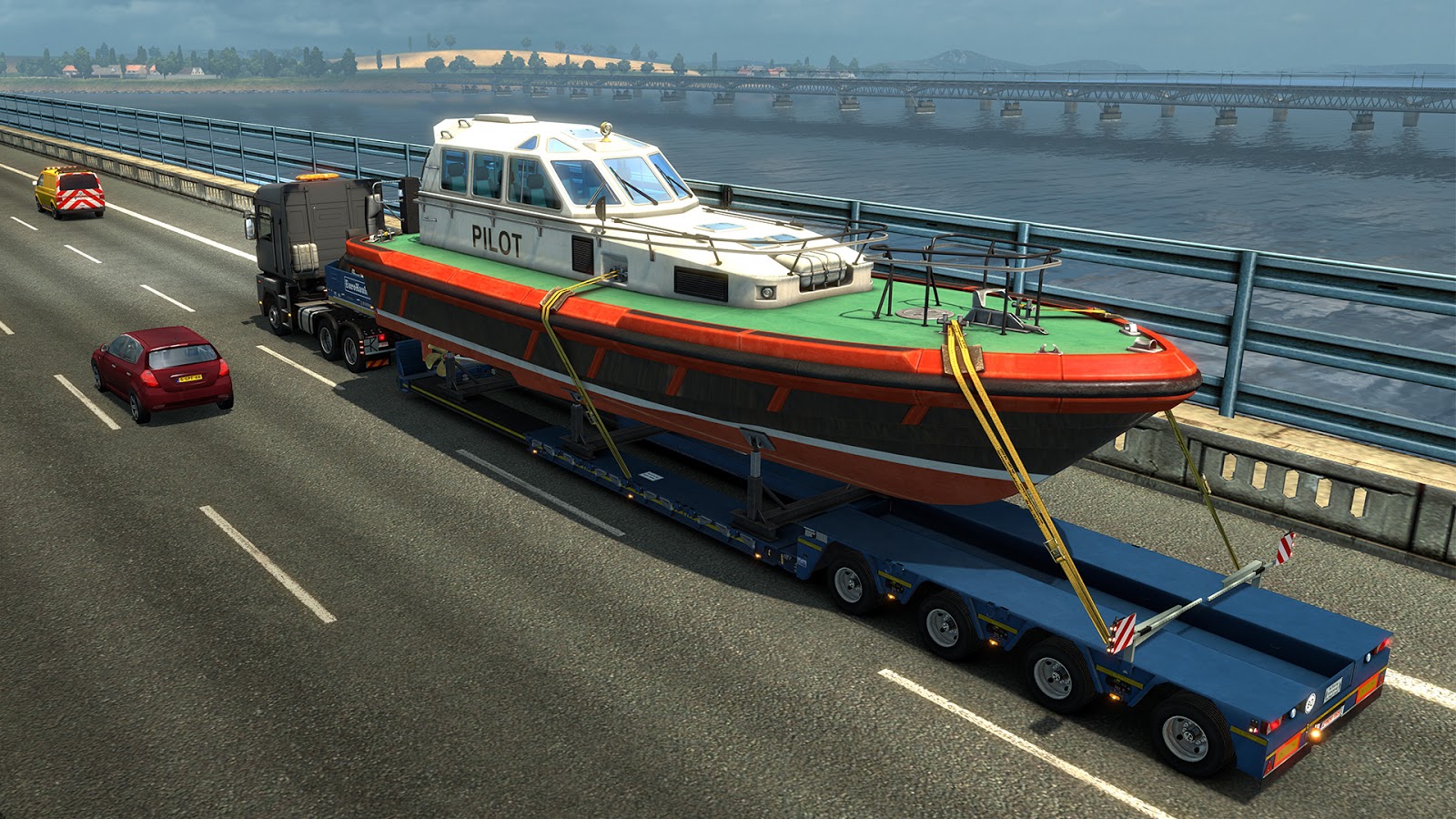
This expansion is quite special for us and not only for its name. It's not just about a bunch of new highly detailed 3D models - as the regulations of oversize transports are very specific, we had to develop a ton of new AI code and created a sort of a game inside a game.

These jobs just don't allow you the same degree of freedom to roam the continent as standard deliveries, quite the contrary, you have to adhere to very strict instructions, keep your hand steady on the steering wheel and your eyes on every centimeter of the road. We have spent over a year coding and scripting the functionality and the first batch of Special Transport jobs for the release, but it's only a start, we are committed to bringing you a wider variety of routes in the future.

Your route will be secured by two escort vehicles guiding you through the transport job from its start to the place of delivery. It's not going to be a piece of cake, but if you obey the escort vehicles' advice and deliver the cargo in pristine condition, you can consider yourself a real pro, a true veteran behind the wheel who can deliver even the most enormous cargoes.

Let's take a look what the Special Transport DLC for ETS2 offers:

Key Features


  • 11 huge cargoes (up to 70 tons, 6 m width, 5+ m height and 20+ m length)
  • 4 new special trailers
  • Unique job routes for to challenge you with Special Transport (most in the base map, some through DLC expansions, more to come!)
  • A combination of over 80 Special Transport Jobs
  • Custom AI escort vehicles
  • Original intros for the cargoes and jobs, crowds and police cars along the routes
  • New models, characters, and animations of people assisting or spectating the transport
  • Curious pedestrians, journalists or transport co-workers along the routes
  • A new set of warning beacons for the trucks
  • Special Transport Achievements


 Gameplay Features

  • Close collaboration with AI escort vehicles required
  • Enhanced AI behavior: clearing the path, stopping traffic, giving advice, pushing opposing vehicles to the side etc.
  • The risk to fail the given Job on the spot if you do not adhere to strict instructions or regulations
  • New checkpoints system to keep your progress in a special transport job safe

We hope that you still have some free time left in your Christmas 2017 Calendar because these enormous cargoes will require some truly dedicated drivers to deliver them safely!

Tuesday, November 14, 2017

SCS 'On The Road': Game Developer Session 2017

Our small 'On the Road' crew had a really great time at Transport Expo 2017. Here is a photo from the event. It was a pleasure to talk to quite a bunch of dedicated and knowledgeable fans who visited us!


We are already in the middle of preparations for another event. Our next stop will be Game Developer Session 2017, a special conference for professional as well as wannabe game developers, to be held November 17-18 in Prague, Czech Republic.

We are looking forward to meeting industry peers from the region of Central Europe and listening to speeches presented by experts from around the globe.


We'll be there with one of our 4D motion seats (just the seat, the whole truck & trailer won't fit inside this 19th century historical building!). The motion seat powered by our games is a great piece of technology to show off and brag about, and should be handy for starting conversations. ;)

Also, one of our colleagues - Patrik, a senior map designer in our ATS team - will be giving a speech explaining the complexities of building a rich road network for our truck simulation games. We hope that it will be of interest for fellow game and map designers from other game companies as well as for students visiting the conference.

Friday, October 27, 2017

BIG Announcement

Today, we'd like to provide you with a quite detailed look at a project that has been underway for well over a year - our upcoming Special Transport DLC for Euro Truck Simulator 2.

We have hinted at its existence in last year's New Year Wishes video, at that point we actually thought that we would be ready to release it in only a few months. Obviously, the project needed more time to mature. So we kept on working; you may have noticed that a few months ago a screenshot was revealed in a report from Gamescom 2017 private presentation. Recently several curious visitors were allowed to try it at Warsaw Games Week 2017 and then we've allowed local TV to come to try and record it as a little teaser.

Ultimately, a cross-disciplinary team has poured an incredible amount of time into this project, and today we are finally revealing it in full glory.

But first, a photo...


Some time ago, a couple of our colleagues were invited to become a part of a convoy for oversized transport of a huge metal tank to the city of Mělník, Czech Republic. This rare two-day experience had one goal - to gather as much data and info as possible about the whole transport and how things like this are done. Why? Because we know that our community is obsessed with realism and authenticity, you guys are always pushing us to make things more real, and want to avoid making big and unnecessary mistakes. A lot our fans are very vocal about getting something new and more challenging to test your skills. We felt that it's time to try and satisfy some of this hunger!


A lot of time has passed, and now as you can see in the video below, we are testing one of these Special Transport jobs on our motion seat in the office. What's going on there? It's quite big, right? And what are those cars with flashing beacons? Are they perhaps escort vehicles?


Yes, they are. Yes, the cargo is big, it's huge. And yes, the escort vehicles can affect the traffic. There will be two of these, one escorting the player in front of him/her and one in the back. Their purpose is clear, to assist the driver to get the cargo from the start to the finish line of each special transport job. But that's not all.


Let's review what this DLC is all about: 

  • 11 New Special Cargoes (up to 70 tons, 6 m width, 5+ m height and 20+ m length)
  • 4 New Trailers
  • 17 Unique Routes with the Special Transport Jobs (12 Base Map, 2 Scandinavia, 2 Going East!, 1 Vive la France !). This list will grow over time.
  • A combination of over 80 Special Transport Jobs
  • Escort Vehicles with a custom AI like clearing the path, stopping traffic, giving advice, pushing opposing vehicles to the side etc.
  • Special intros and cutscenes related to the cargoes, missions or places along the routes
  • New Models, characters, and animations of people around the scene
  • Pedestrians, journalists or transport co-workers along the routes recognizing day, night or bad weather
  • Possibility to Fail the "Mission" if you do not adhere to strict regulations
  • New Checkpoints System to keep your progress in a special transport job safe
  • New Warning Beacons Animations
  • New Achievements
  • Higher XP and Money Profit for successful completion of this type of jobs


There is more, but we think that's enough for now. Better do some preparing, because this is going to be the biggest challenge for you and your mighty diesel beast so far!

We are not yet ready to promise a particular release date, but the wait should not be too long anymore. We are super busy finalizing, bug-testing, and releasing a lot of stuff that we want to get into your hands before the end of the year, but we hope that you will have a chance to deliver Special Cargo in Euro Truck Simulator 2 still this side of Christmas.