Showing posts with label Convoy. Show all posts

Thursday, December 8, 2022

Convoy: Dedicated Servers Support

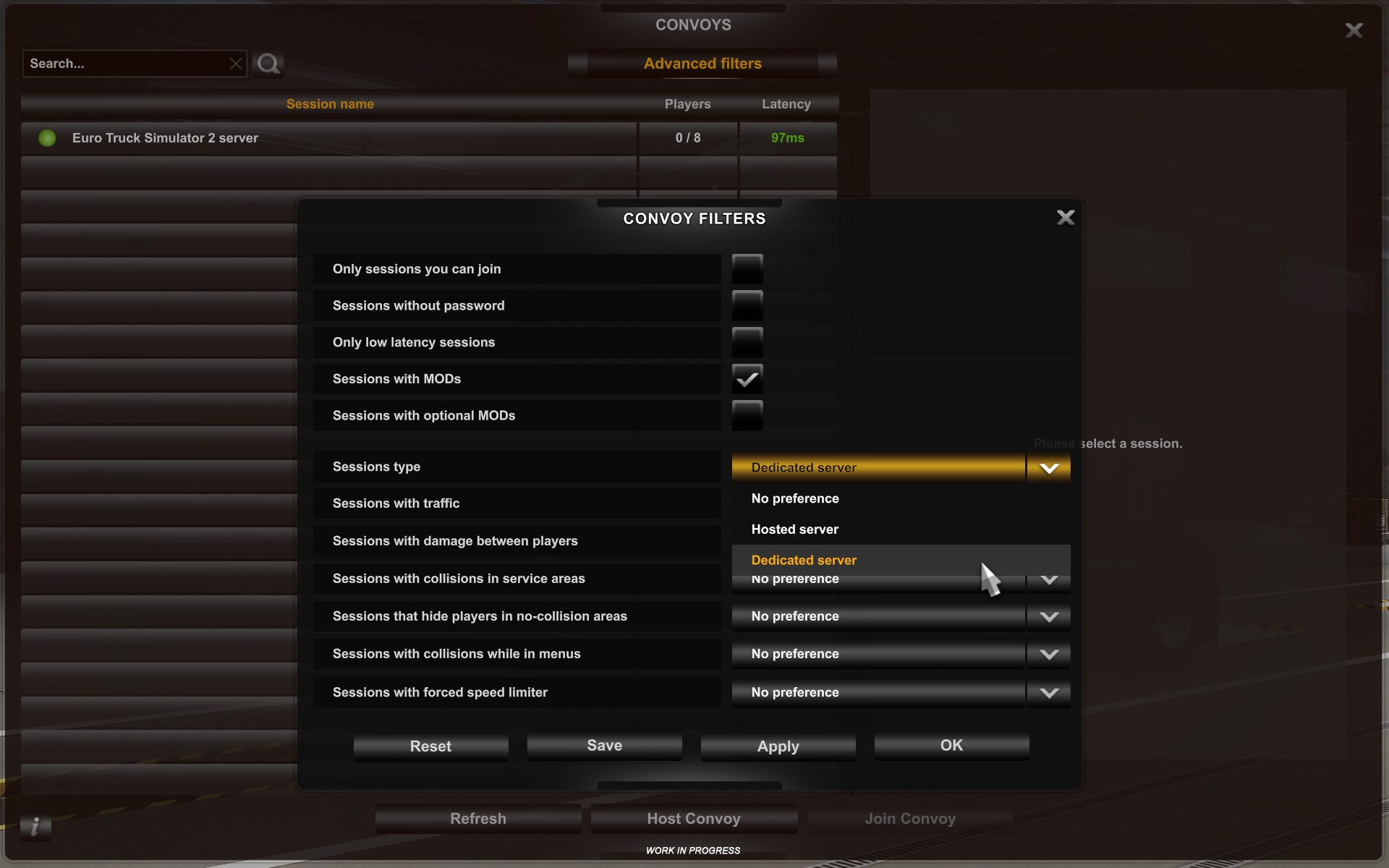
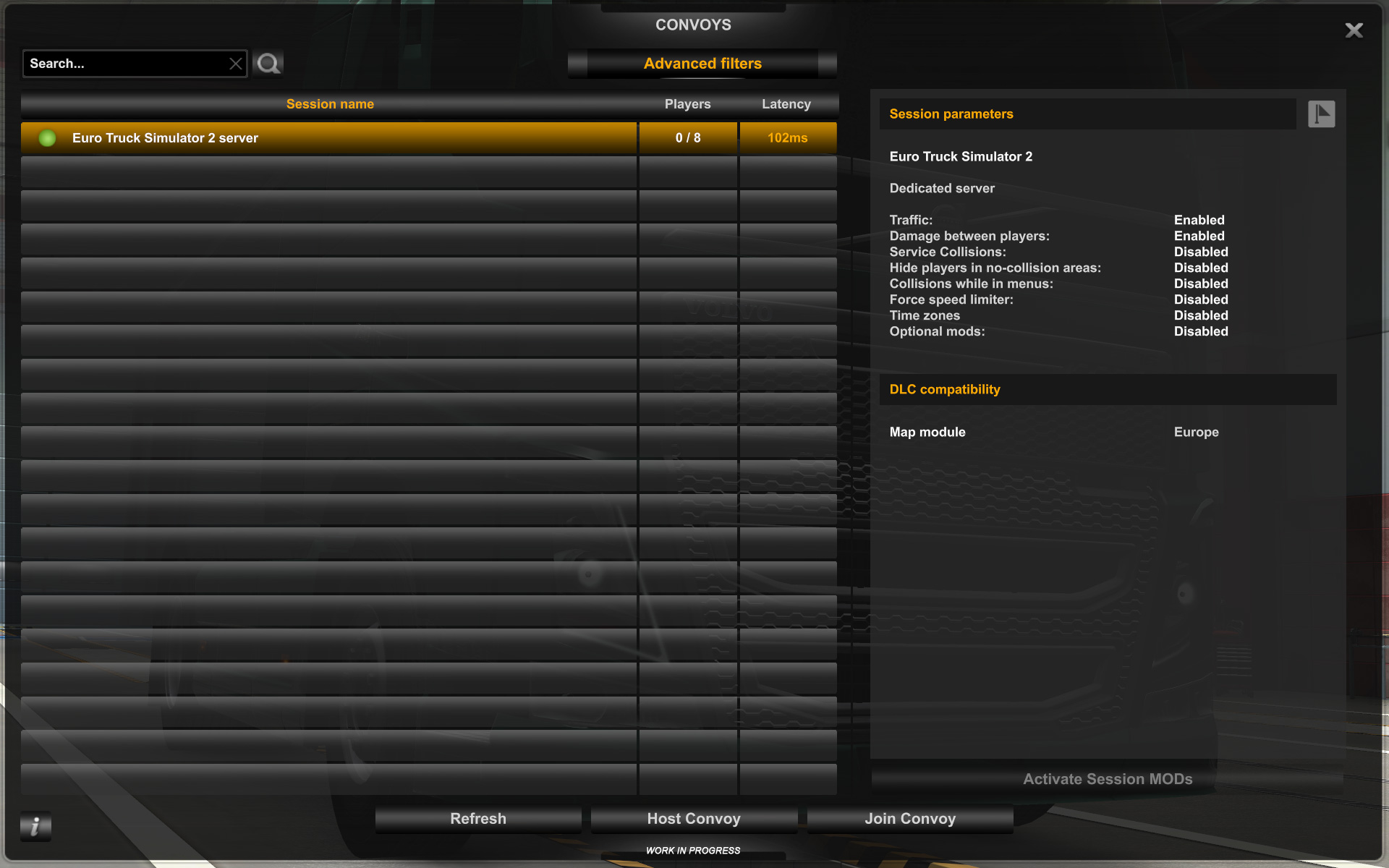
Since the release of Convoy, our native multiplayer mode for Euro Truck Simulator 2 and American Truck Simulator, we have been making small updates to further improve the players' experience. Today we are excited to share that a much-requested addition has arrived and that is the option to host a dedicated server! 

So what are the main differences between hosting a dedicated server and just creating a convoy session through the main menu? One of the biggest advantages of hosting a dedicated server is that your session will always be running, even without any players online (unlike a convoy that needs a host). This means players are free to join the session to continue their job and leave again freely when they need to without worry. You can also run a dedicated server without having any ownership of the game or the DLCs. 

Another advantage is that you don't have to run the server on your own machine. You can run the server standalone outside of the Steam client with no user interface on a rented or paid-for server that a hosting company owns. Alternatively, it is also possible to download the tool via the Steam Console Client (or SteamCMD) which is a command-line version of the Steam client. Its primary use is to install and update various dedicated servers available on Steam using a command-line interface.

It is also possible to host multiple instances if you so wish, however, keep in mind your server or system specs when doing this. Another important note we would like to include is that dedicated servers do not handle NAT punching. However, sessions hidden behind NAT can still be found via the direct search function. 

If this is your first time setting up or using a dedicated server, we understand things may seem a bit complicated or overwhelming. That's why we've included some documentation (a readme file) in the dedicated server package, which includes information on how to get started and important commands that'll help you get the content you want on your server. We hope that this helps you when it comes to setting up for the first time.

When setting up a dedicated ETS2 or ATS server, it is also important to create a list of 'known players' in the config file, this will give the listed player admin controls, which will provide them with the option to moderate players on the server. 

Ready to get going? The Dedicated Server tool is now available for both Euro Truck Simulator 2 and American Truck Simulator, which you can download for free from the Steam Client. If you don't own the game then the Dedicated Server app will not be displayed in the list of available tools. In this situation, you need to use SteamCMD for installation with the Steam IDs below.

  • Euro Truck Simulator 2 Dedicated Server ID = 1948160
  • American Truck Simulator Dedicated Server ID = 2239530

We look forward to seeing how you get creative with your dedicated servers and wish you many miles of happy trucking together. 

However, please keep in mind that this is the first iteration and that there may be a few bugs or things that need tweaking. We also plan to bring you more extensive tools and moderation features in future updates. However, for now, all the features of a standard dedicated server should be available. If you have any feedback, we'd love to hear from you on our official forums. 

Tuesday, August 17, 2021

Convoy FAQ

In our latest 1.41 update for Euro Truck Simulator 2 and American Truck Simulator, we introduced Convoy! Convoy is a new multiplayer game mode where players can set up and host their own private sessions (password optional) to drive with their friends or other fellow truckers. With synchronized AI traffic, time and weather, and the ability to take the same job as other players, lots of you have been enjoying trucking together. 

However, we know that many of you still have questions about Convoy, which is why we are bringing this blog post with answers to the most frequently asked questions across our social media channels.

Will the maximum players limit be increased?

Eventually, yes. Convoy currently allows you to create and host an online session with up to 8 players. We expect to be able to raise the player limit in the future, however, we are keeping it small at this time due to its work-in-progress nature. There are important performance optimizations as well as better moderation tools under development that we would like to have in place first before increasing the limit.

Will there be MOD support in Convoy?

Eventually, yes. We are looking into supporting third-party modifications in Convoy multiplayer sessions. While it's not technically so difficult to connect players with an identical set of mods, there are many potential problems to handle when it comes to coming up with a safe and robust way to synchronize sessions of players joining in with different mods, and then back again when they wish to revert to the previous state to continue playing with their regular player profile.

How do I add someone to my friends that I enjoyed driving with?

You can add someone you played with recently on Convoy via the Steam client or overlay. Just click on the view tab (or view players in the Steam overlay), then on players. This will bring up a list of players you recently played with and a link to their profiles.

Another alternative way of adding them would be to ask for their Steam friend code, which allows you to add them with ease! Simply open your friends list and click on the 'Add Friend' located on the right-hand side of the top bar. This will take you to you a page that will show your unique Friend code and a space to enter another person's code, which will send them a friend request! 

I can't see my friend's hosted session.

Make sure you are friends on Steam and that you both have the latest version of the game updated and that you are all set to online on your Steams friend list.

A possible reason you may not see a friend's hosted session is that you can only see sessions that are hosted in the same region as you. This means you may not be able to see a friend's hosted session if they live very far away from you. To join a distant friend's session, you may need to change your Steam download region to match theirs, which will allow you to view hosted sessions in that region. To do this, follow this handy guide!

If you know your friend's sessions name, you can search globally for the session by using the search bar found above the session list. This should bring up your friend's session no matter their region. Make sure to search for the session name exactly as it is written, including any symbols, numbers, punctuation, and abbreviations.

Additionally, you may not be able to see full sessions.

Dedicated servers, can we host them?

There is no option to host a dedicated server yet, however it is something we are looking into providing potentially in the future.

What about map DLCs, do all players need to own the same ones?! 

No! Players do not need to own any DLC in order to join the Convoy multiplayer mode. However, just remember that you will not be able to see or drive in DLC map areas if you do not own them yourself.

Can I turn off the nametags of other players?

Yes! You can use the default hotkey of 'Z' to enable and disable nametags in Convoy! If you wish to change this hotkey, you can do so in the options found in your main menu. It even works when using the photo studio to take a group photo together! 

Is there a speed limit in Convoy mode?

Convoy sessions have the option of setting a speed limit ON for the entire session by default. However, hosts have the option of turning this off, if they so wish to. In that case, the speed limiter will follow your local settings. Just remember that World of Trucks contracts enforce the speed limit on all jobs, regardless of the option set by the host.

Do I have to download the Convoy update if I am not planning on playing it?

Convoy is a game feature available since version 1.41, it is not a separate update line. Of course, it's totally up to you whether you use the feature or not.

There may be valid reasons for players to stay with an older version of the game, perhaps temporarily until a mod important to them catches up, and for this reason, we are providing branches of important previous updates of our games on Steam. By default, Steam updates the games automatically, so you may consider opting out of these automatic updates if this is a concern. However, please note that all further updates to both Euro Truck Simulator 2 and American Truck Simulator will contain the Convoy multiplayer feature. This means that if you do not plan on updating, you will not get any further updates, content, and fixes and that version 1.40 will be your final stop. 

If you want to use and play on the Convoy multiplayer mode, you MUST be on the latest version of the game (1.41 or higher).

I am constantly having FPS problems in Convoy mode only.

The Convoy multiplayer mode is more demanding than single-player because it renders a higher number of player trucks. Because of this, it is normal to experience a lower frames per second (FPS). However, if your FPS numbers are suspiciously low, reach out to our support email at support@scssoft.com with a detailed description of your problem.

Our programmers are pursuing several lines of optimizations to improve performance overall and also in multiplayer-specific context, but it may take several more game updates until these code improvements are ready.

Does the session have to end if the hosting player leaves?

Yes, as soon as the host of the session leaves, the server will be closed and this will disconnect all players from the server. If this happens unexpectedly, do not panic, as you will be greeted with options to proceed with the progress you've made in the session, or to revert it if you so wish to (for reasons such as the loss of in-game currency, damage, or other progress reasons). 

Note that if you accept the progress, you will remain wherever you were when the session ended, effectively finding yourself back in singleplayer mode. From there, you can once again create a new session and continue with either the same or a different group of people if you wish to do so.

How can I unban someone who I banned in the Convoy session?

If you wish to unban players, you need to go into your "profiles" folder in the respective ATS/ETS2 folders in documents, select the exact profile where the ban happened and find a text file called "banlist". Open the file with a text editor and remove the line with the banned user. You will have to restart the Convoy session afterward.

Is Convoy a form of peer-to-peer gaming?

While the Convoy sessions are hosted by the players themselves, one player always works as a server and therefore acts as a junction for other players. Everyone else communicates with this particular server in the end. More specifically it is the usual client-server communication layout with all clients having authority over specific objects.

-------

We hope this answers the majority of the most frequently asked questions by our community about Convoy! We love seeing you drive and deliver together and we hope to see more of your photos & video content shared with us on our social media channels (Facebook, Twitter, Instagram). Happy Trucking! 

Friday, July 30, 2021

Convoy - Community Spotlight

With the recent release of the Convoy feature for ATS and ETS2, our social media channels have witnessed an avalanche of absolutely incredible photos and videos from your first multiplayer journeys, in which you and your friends were taking on the same jobs and delivering cargo together. It’s difficult to simply express with words how much we appreciate this kind of feedback, since in the end, whatever we do we are doing for the happiness of our #BestCommunityEver. 

What you will see here is just a small selection of videos we have laid our eyes on and there is much more here and here. Feel free to keep sending us pictures and videos on our social media - Facebook, Twitter and Instagram, and we’ll make sure to check them out as well!

In addition to screenshots and videos, quite often there are developers who are watching the ETS2 and ATS categories on Twitch, so the streamers certainly do not have to feel left out.

We also immensely value the amount of positive feedback we have received for the update in comment sections and on our forums. We know you have been waiting to drive together with your friends for a long time, so do not be afraid and start a Convoy session yourself or jump into an already created one and work together with your fellow truckers in this awesome new multiplayer experience!

Saturday, July 10, 2021

Convoy on the Horizon, Get Ready to Join!

An interesting couple of weeks full of testing is behind us and we have been making great improvements largely thanks to your feedback, our #BestCommunityEver. The time to switch gears and drive forward into the future is almost here and we believe now is the right time for another teaser! 

In case you have missed our coverage of experimental and open betas and want to learn more about our upcoming Convoy gameplay mode, you can read more about it in the 1.41 Update Open Beta blog articles (ETS2, ATS). Apart from celebrating your fellow truckers on International Friendship Day, which is this month (how convenient, right?), you will also have a chance to join them on the road, taking the same job and delivering cargo together, navigating through synchronized traffic, braving the weather along the route and much more!

But before all this will come with the 1.41 release, let us put you in the right mood with this video:

The full release of the 1.41 update is coming soon, hopefully in a matter of days. So now is the best time to let your friends know what’s happening so everyone is ready for its arrival. We hope to see you doing some deliveries on the roads of ETS2 and ATS together!

Thursday, June 17, 2021

Euro Truck Simulator 2: 1.41 Update Open Beta

We love to bring you new game updates, especially when they contain features that have been requested for a long time! Today, we are happy to share with you that Update 1.41 Open Beta for Euro Truck Simulator 2 is now ready to be tested by our community!

However, please keep in mind that this is the first iteration of the open beta, which is still very much a work-in-progress build. If you want to take it for a spin, you can help contribute by reporting any bugs you may encounter in the appropriate section of our official forum. Your feedback and reports are extremely valuable for our team and we thank you in advance for taking the time to help us out.

Please bear in mind that this update will likely render many community MODs incompatible. MOD authors may need to adjust and update their mods to work with this update. We strongly recommend that you use a profile without any third-party modifications if you wish to participate in the 1.41 Open Beta. 

So, let's take a look at what the 1.41 update has in store!

Convoy Multiplayer Open Beta

Convoy is a new multiplayer game mode, where players can set up and host their own private sessions (password optional) to drive with their friends or other fellow truckers. There is currently support for synchronized AI traffic, time and weather, and the ability to take the same job as other players.

During this open beta phase, Convoy will allow you to create and host an online session with up to 8 players. We plan to eventually raise the player limit in the future, however, we are keeping it small at this time due to its work-in-progress nature. Session hosts will automatically be made admins of these sessions, allowing them to ultimately control what kind of environment they want to have online, as well as having the ability to kick any trouble-makers from the session. 

You can also see, filter, browse and eventually join any of the available sessions that have been already created by your friends or other truckers.

So what options and features will players be able to use and experience in the open beta of Convoy? 

    • Any player can host and create their own private sessions for up to 8 people
    • Ability to haul the same contracts/jobs together from the same company and to the same destination
    • Synchronized AI traffic (random events included)
    • Synchronized time and weather
    • Synchronized paint jobs, truck accessories, cabin accessories, cargoes and more
    • Ability to communicate with other drivers via CB radio broadcast (X key), quick replies (Q key), or text chat (Y key)


    We know how many players are eager to try out this new feature; however, there are some things you will need to know before joining your friends on the road! Convoy is in a beta phase, which means you may potentially run into some bugs, imperfections, or unexpected problems whilst driving. 

    Notable issues / not yet implemented:
    • Mods in Convoy mode are not supported in the initial release.
    • When using an owned trailer, there might be a company trailer spawned in the same location you are supposed to go to to load your cargo.
    • AI vehicles might disappear when a player disconnects.
    • Lifting bridges are not synchronized. They will be stationary for the initial release of Convoy.
    • Steam invites work only through the Steam overlay.
    • CB radio broadcast (hotkey "X") interferes with the text input line.
    • The on-screen map in Convoy "M" zooms out together with chat scrolling in the Route Advisor.
    Worried about your profile progress? In-case of trouble-makers or other circumstances out of your control, players will have the option to revert their save to one made previously before joining the session. From friends to VTC's, we are excited to see how you will enjoy Convoy and we look forward to hearing your constructive feedback on this new online feature.


    A-24 Iberia DLC Addition

    Today, we are happy to bring a new piece of the road network to the latest map expansion for ETS2. This update to Iberia carries the Autoestrada A24 which runs north to south across the Douro river valley, connecting A7 and A25. It passes through a very scenic region of Portugal, famous for its many vineyards. 

    Originally, this road was considered for release with Iberia DLC, but we did not manage to complete it in time. We decided to finish A24 anyway and bring it to you in an update, as we did not want to leave this beautiful part of Portugal behind!

    Our teams are listening to feedback and making changes accordingly for upcoming updates and beyond. We look forward to bringing you similar development news in the near future, be sure to keep your suggestions and feedback coming as it really helps motivate us to improve our content.

    Photo Mode: Time & Weather options

    We know how much our players love to take photos in-game and spend a lot of time creating that perfect shot, and for many, this also includes finding the right lighting conditions and weather. So to help create that perfect trucking memory, we have implemented a new feature that may save you quite a bit of time when it comes to using console commands! 

    Introducing the new Time and Weather options! Players will now be able to choose the conditions of their liking, to create the perfect trucking snap just by simply adjusting a new slider to change the time, or clicking on two buttons to control the lighting/weather, all of which will appear in the updated in-game photo studio. We can't wait to see how drivers will use this new feature in the future and we look forward to seeing your snaps! 

    Changelog:

    Gameplay:

    • Convoy Multiplayer
    • Time and weather adjustments in photo mode
    • Quick Travel

    Map 

    • A-24 Douro Road Addition to Iberia DLC
    • Iberia map fixes 
    • Various road signs reskinned across Europe
    • Navigation sign reflection fix

    UI

    • New icons on the map legend


    So enjoy all the new additions, but please remember: It's only an open beta, not a stable public version - so you may encounter bugs, instability, or crashes. It's completely okay if you want to wait for the final release. But if you're interested in helping us to get there faster, we'll appreciate all of your feedback on our forum and your bug reports in this section.

    Please check our modding wiki to get details pertaining to mods for the game.

    If you wish to participate in the open beta, you can find this version in the public_beta branch on Steam. The way to access it is as follows: Steam client → LIBRARY → right-click on Euro Truck Simulator 2 → Properties → Betas tab → public_beta → Public Beta 1.41. No password required.

    Wednesday, June 9, 2021

    American Truck Simulator 1.41 Open Beta

    We love to bring you new game updates, especially when they contain features that have been requested for a long time! Those who are familiar with our forum probably already heard about our quietly released Experimental Open Beta for 1.41 update, which we have decided to release without extra promotion so we could closely and carefully monitor the first wave of community feedback. Convoy is, for sure, the most anticipated content coming to ATS with this update. Today, we are happy to share with you that Update 1.41 Open Beta for American Truck Simulator is now ready to be tested fully and publicly by our community!

    However, please keep in mind that this is still an open beta, which remains in a very much work-in-progress state. If you want to take it for a spin, you can help contribute by reporting any bugs you may encounter in the appropriate section of our official forum. Your feedback and reports are extremely valuable for our team and we thank you in advance for taking the time to help us out.

    Please bear in mind that this update will likely render many community MODs incompatible. MOD authors may need to adjust and update their mods to work with this update. We strongly recommend that you use a profile without any third-party modifications if you wish to participate in the 1.41 Open Beta. 

    So, let's take a look at what the 1.41 update has in store!

    Convoy Multiplayer Open Beta

    Convoy is a new multiplayer game mode, where players can set up and host their own private sessions (password optional) to drive with their friends or other fellow truckers. There is currently support for synchronized AI traffic, time and weather, and the ability to take the same job as other players.

    During this open beta phase, Convoy will allow you to create and host an online session with up to 8 players. We plan to eventually raise the player limit in the future, however, we are keeping it small at this time due to its work-in-progress nature. Session hosts will automatically be made admins of these sessions, allowing them to ultimately control what kind of environment they want to have online, as well as having the ability to kick any trouble-makers from the session. 


    You can also see, filter, browse and eventually join any of the available sessions that have been already created by your friends or other truckers.


    So what options and features will players be able to use and experience in the open beta of Convoy? 

    • Any player can host and create their own private sessions for up to 8 people
    • Ability to haul the same contracts/jobs together from the same company and to the same destination
    • Synchronized AI traffic
    • Synchronized time and weather
    • Synchronized paint jobs, truck accessories, cabin accessories, cargoes, and more
    • Ability to communicate with other drivers via CB radio broadcast (X key), quick replies (Q key), or text chat (Y key)


    We know how many players are eager to try out this new feature; however, there are some things you will need to know before joining your friends on the road! Convoy is in a beta phase, which means you may potentially run into some bugs, imperfections, or unexpected problems whilst driving. 

    Notable issues / not yet implemented:
    • Mods in Convoy mode are not supported in the initial release.
    • AI vehicles might disappear when a player disconnects.
    • Lifting bridges are not synchronized. They will be stationary for the initial release of Convoy.
    • When using an owned trailer, there might be a company trailer spawned in the same location you are supposed to go to to load your cargo.
    • Steam invites work only through the Steam overlay.
    • CB radio broadcast (hotkey "X") interferes with the text input line.
    • The on-screen map in Convoy "M" zooms out together with chat scrolling in the Route Advisor.

    Worried about your profile progress? In case of trouble-makers or other circumstances out of your control, players will have the option to revert their save to one made previously before joining the session. From friends to VTC's, we are excited to see how you will enjoy Convoy and we look forward to hearing your constructive feedback on this new online feature.


    California Reskin

    During our special Christmas 2020 live stream, we announced that we would be revisiting California in American Truck Simulator to give our starting state a reskin! Today, we bring the first iteration of this reskin, carrying a major road layout rework, agriculture stations, and more!

    One of the most noticeable changes drivers will experience when arriving in California are the new agriculture border control stations! All drivers hauling goods into the state will have to undergo special checks from the control station where vehicles are inspected for commodities that may be infested with invasive species, and for the correct documentation. In-game, we will mimic these scenarios with a new feature, which will work very similarly to the current weigh stations. Upon your arrival at the border, depending on what you are hauling, drivers will be notified to pull over for an inspection at one of the control stations before they are given the green light to enter the state. 

    Our world design tools have been considerably improved during the years since ATS was released as well, and we plan to take advantage of the new power. For example, our map designers can now pay attention to details like the proper roll of the road surface in a curve. We are also trying to make sure we get our research right when it comes to unique road signage elements, proper road markings, or the use of cat's eyes. We hope to achieve a completely new look and feel when driving across the State. Read more here.

    Photo Mode: Time & Weather options

    We know how much our players love to take photos in-game and spend a lot of time creating that perfect shot, and for many, this also includes finding the right lighting conditions and weather. So to help create that perfect trucking memory, we have implemented a new feature that may save you quite a bit of time when it comes to using console commands! 

    Introducing the new Time and Weather options! Players will now be able to choose the conditions of their liking, to create the perfect trucking snap just by simply adjusting a new slider to change the time, or clicking on two buttons to control the lighting/weather, all of which will appear in the updated in-game photo studio. We can't wait to see how drivers will use this new feature in the future and we look forward to seeing your snaps! 

    Changelog:

    Gameplay:

    • Convoy Multiplayer 
    • Time and weather adjustments in photo mode
    • Quick Travel

    Map 

    • California Reskin part 1 including 7 Agricultural Stations and a road layout rework 

    UI

    • New icons in the map legend

    So enjoy all the new additions, but please remember: It's only an open beta, not a stable public version - so you may encounter bugs, instability, or crashes. It's completely okay if you want to wait for the final release. But if you're interested in helping us to get there faster, we'll appreciate all of your feedback on our forum and your bug reports in this section.

    Please check our modding wiki to get details pertaining to mods for the game.

    If you wish to participate in the open beta, you can find this version in the public_beta branch on Steam. The way to access it is as follows: Steam client → LIBRARY → right-click on American Truck Simulator → Properties → Betas tab → public_beta → 1.41. No password required. Somtimes you have to restart your Steam client to see the correct branch name there.